The advent of C
In the previous lesson, the reason we talked about machine code and assembly language is because we need to understand how the technologies that we use today came to be, and why they are the way they are. But more importantly, to understand the inner workings of a computer. Having this knowledge will make you a better programmer because even though you may never see it, they are always at work under the hood.
Now let’s look at a brief history of C.
- FORTRAN (1957): The first high-level language. Great for math, but it couldn’t talk to hardware well enough to build an operating system.
- ALGOL (1958): A theoretical masterpiece that influenced everything but was hard to implement.
- BCPL (1966): Basic Combined Programming Language. It was stripped down to be fast.
- B (1969): Ken Thompson took BCPL and simplified it even further. It was called “B” simply because it was the first letter of BCPL.
In 1972, Dennis Ritchie evolved B into C at Bell Labs by adding data types, structs and better memory management. He called it “C” because it was the next letter in the alphabet.
During the 1980s, C gradually gained popularity. It has become one of the most widely used programming languages, with C compilers available for practically all modern computer architectures and operating systems.
C is often called a middle-level language because it has the power of Assembly (it can touch memory directly) but the readability of a high-level language.
Portability was its killer feature. Before C, if you bought a new computer, you had to rewrite all your software. With C, you just needed a new compiler for that machine.
Stages of C program compilation
The compiler converts the C program that you write into binary machine code that the computer can execute.
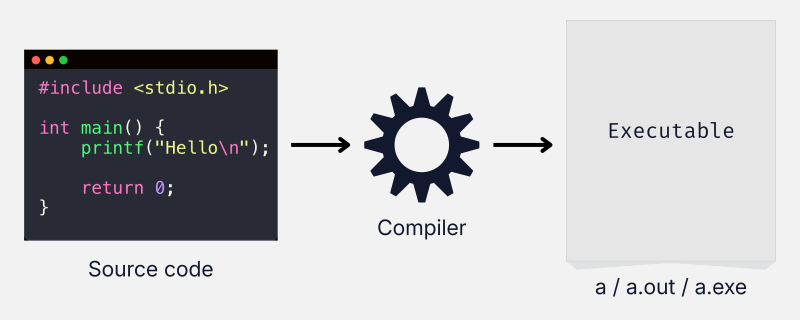
When you run the compiler, it performs the following steps:
C Source Code
    ↓
Preprocessing
    ↓
Compilation
    ↓
Assembly
    ↓
Linking
    ↓
Executable
Source code
Source code is the code that you write as a programmer.
Suppose you write a simple C program to print “Hello”:
#include <stdio.h>

int main() {
    printf("Hello\n");

    return 0;
}Don’t worry if you don’t understand the syntax yet. At this stage, all you need to know is that this is a C program that prints “Hello”.
This program, in a human-readable form, is called source code. It is the original version of your program before it is compiled into machine code.
We have been using the words “code” and “program” interchangeably. In this context, they often mean the same thing.
However, the word program can be more ambiguous. In the previous lesson, we used it to refer to applications that you run on a computer to perform tasks.
In other words, both the human-readable source code and the compiled executable file can be called a program, depending on the context.
Preprocessing
- Expands
#include - Expands
#definemacros - Handles conditional compilation (
#if,#ifdef, etc.) - Removes comments
The result is expanded source code often called a Translation Unit.
Compilation
- Parses the expanded code from the preprocessor
- Checks syntax and static types
- Builds an internal representation (AST [Abstract Syntax Tree])
- Optimizes the logic for performance
- Translates it into architecture-specific assembly language (e.g., x86 or ARM)
At this stage:
C → AssemblyAssembly
The assembler converts:
Assembly → Machine CodeThe result is Object Files (.o or .obj). These contain binary machine code, but they are incomplete because they don’t yet know the memory addresses of functions stored elsewhere.
Linking
The linker:
- Connects your object files with Standard Libraries (like
libc) - Resolves external symbols (matching a function call like
printfto its actual location in the library) - Combines everything into a single, cohesive file
Executable
The final output is an executable binary containing machine code ready for the CPU to run.
On Linux/Unix, it is typically an ELF (Executable and Linkable Format) file (often named a.out by default):
a.out (or just 'a')On Windows, it is a PE (Portable Executable) file:
a.exeWhat is an executable?
You might be wondering what exactly an executable is.
The source code is not your application. The executable is.
Source code → CPU ❌ cannot understand
Executable → CPU ✅ can execute
Suppose you wanted to build a calculator on your Windows computer to perform basic math operations.
- You would create a file called
calculator.cand write your code in it. - Then you would compile it, which would generate an executable called
calculator.exe.
The source code calculator.c is not the calculator.
The executable calculator.exe is your calculator application that you can now use to perform the tasks that you programmed it for, which in this case are basic math operations.
This executable is now independent of the source code and the compiler. You could send it to another Windows machine with no source code and no compiler, and it would work just fine.
C vs Assembly
Let’s compare Assembly to the C programming language. The purpose of this comparison is to understand why there was a need for a new programming language after Assembly and what are the advantages of C.
| Assembly | C |
|---|---|
| Low-level programming language. It works very close to the hardware. | Middle-level programming language. High-level enough to be easy to write, but low-level enough to control hardware efficiently. |
| Most of the time, one line of assembly code translates roughly into one binary instruction for the CPU. | One line of code can perform many complex actions automatically. |
| Architecture-specific (x86, ARM, etc.). It is tied to one type of CPU chip. | Portable. Write once; compile and run anywhere. |
| Fastest. There are no middlemen, so it runs at the theoretical limit of the hardware. | Very fast. C compilers are extremely efficient. |
Technically, C is classified as a high-level language. The term “middle-level language” is not a formal category in computer science. It is an informal industry term used to describe C due to its unique position.
Below is a comparison of how a simple program that adds numbers from 1 to 10 looks in Assembly and C.
Assembly (x86):
MOV CX, 10
MOV AX, 0
NEXT:
ADD AX, CX
LOOP NEXT
MOV [Sum], AXC:
int sum = 0;
for (int i = 1; i <= 10; i++) {
    sum = sum + i;
}- Machine code made computers functional.
- Assembly language made computers programmable.
- C made programming universal.
A note on portability
Let’s just talk about portability a little bit more so that there are no confusions.
C is portable. This means that the source code needs to be written only once.
However, the executable is not portable. There are mainly two things that affect its portability:
- OS (operating system)
- CPU architecture
If you want to run a C program on a Windows machine, you will have to first install a compiler (if it does not already exist on the machine). Then you will compile the source code which generates a .exe file. You can now run this executable file on any Windows machine, however, you cannot run it on a Mac or Linux.
Furthermore, portability is also limited by the hardware (CPU architecture). If you compile your source code on a Mac with an Intel chip (x86), the resulting executable will only run on Macs with Intel chips. It will not run on a Mac with an Apple Silicon (ARM) chip, even though the operating system (macOS) is the same.
Modern compilers do provide cross-compilation features so that you can compile and generate executables for different operating systems and hardware architectures from a single machine.
Importance of C
- C is often called the mother of all programming languages.
- It sits in the sweet spot between assembly language and high-level languages.
- Its design focuses on efficiency and abstraction without losing touch with the hardware.
- C allows you to manipulate memory directly using pointers. You aren’t just storing a value; you are managing the specific address in the RAM where that value lives.
- It’s incredibly fast.
Learning a high-level language like Python or Java is like learning to drive an automatic car. Sure you can drive a car, but you have no idea how gears and clutch work. Learning C is like learning to drive a manual transmission car. Once you have learned to drive a manual car, you can drive any car in the world comfortably along with a sound understanding of what’s happening under the hood.
- The Linux kernel is primarily written in C. Windows and macOS kernels are largely written in C and C++.
- It’s used to program embedded electronics like engine control unit (ECU) in cars, microwave ovens, and smartwatches.
- C is widely used in aerospace, embedded systems, and safety-critical applications.
- Many programming languages are either implemented in C, rely on a C-based runtime, or use C as a bridge to communicate with the operating system.
Key Takeaways
- C is technically a high-level language because it is designed to be human-readable.
- It is often called a “middle-level” language because it:
- allows manual memory management and direct memory access through pointers
- compiles to native machine code
- can interact directly with hardware and operating systems
- has other bare-metal features
- The compiler converts C source code into an executable.
- Source code is written by the programmer. It is for you.
- The executable is the runnable application. It is for the CPU.
- C source code is portable.
- The portability of an executable is limited by the operating system and the CPU architecture.
Comments 0